Time Tracker: Transparency
This page answers, in plain language, the question "What is actually captured automatically about my working time?". It is deliberately a pure information page, so every employee can always understand which automatic entries appear in the Time Tracker and why.
/hr/time-tracker/transparencyWhat can I do here?
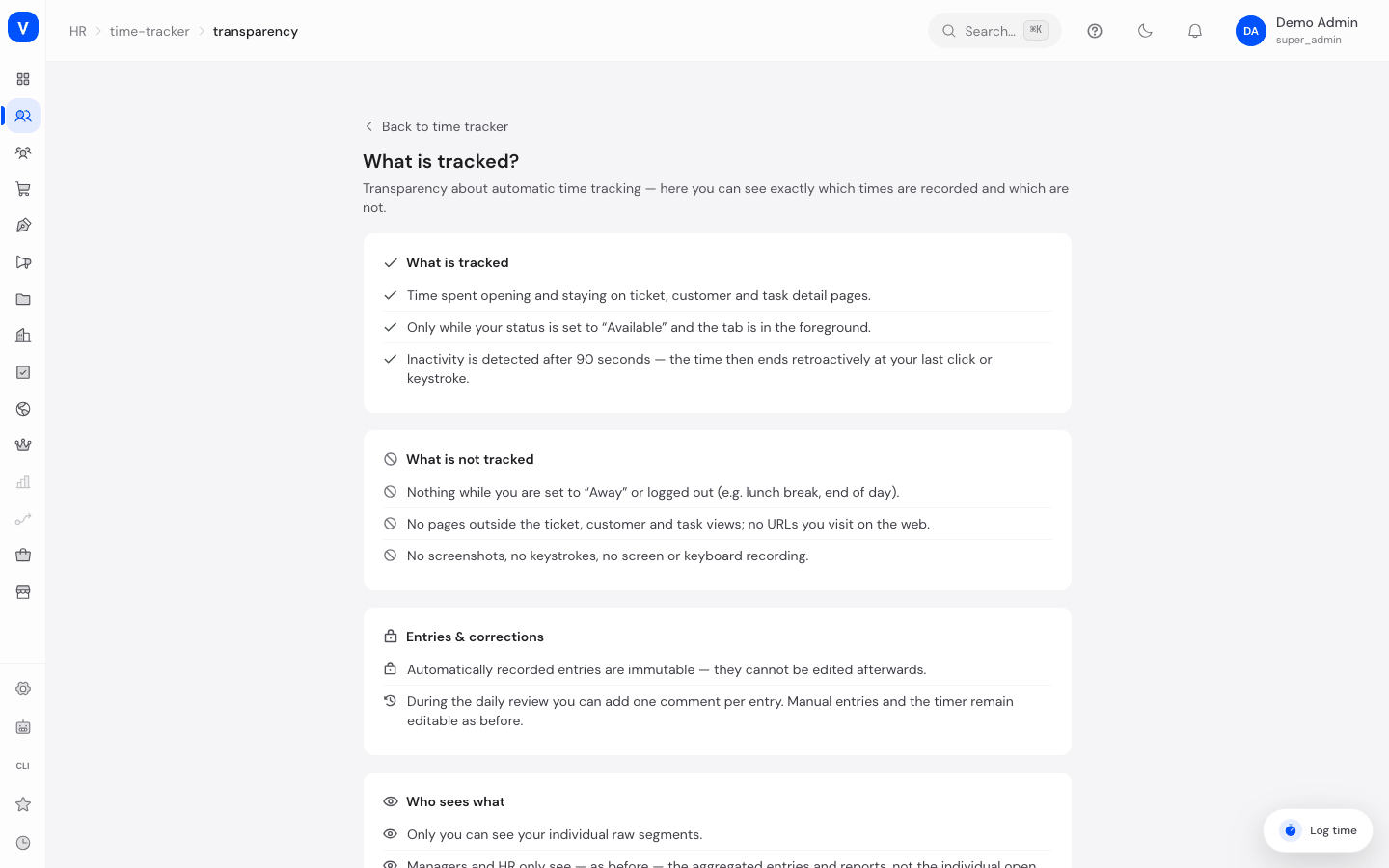
- Read what kind of activity is captured automatically as a time entry
- Read what is explicitly NOT captured
- Understand why automatically captured entries cannot be deleted or edited, only commented on
- Read who can see these entries
- Read a note about the presence status (available/away) and its effect on capturing
Step by step
- Navigate here via the "What is captured?" link on the Time Tracker home page.
- Read the four information blocks: what is captured, what is not captured, how automatic entries are handled, and who can see them.
- Use the back arrow to return to your own day view.
Fields explained
This page has no form fields — it is a pure information page.
Values & statuses
Not applicable — this page has no value lists of its own.
Capture per admin area
Since July 2026 the time tracker additionally captures dwell time per admin area — e.g. "Products", "Orders" or "Invoices" — on top of the four detail views (ticket, company, contact, task). The rules:
- Only the area name and its internal path (e.g.
/shop/products) are stored — never contents, inputs, screenshots or websites visited outside SELLERLOGIC Commerce Services. - No double counting: while an item (e.g. a ticket) is open, only that item counts — area time pauses automatically. A running stopwatch also takes precedence: its time window is subtracted from the area time.
- The usual rules apply unchanged: capture only while your status is "Available" with the tab visible, inactivity ends the time retroactively, and an automatic entry is only created from 2 minutes of daily activity per area.
Capture of phone calls
Completed phone calls are also captured automatically — independent of the browser, since the information comes straight from the phone system (or from a call completed in the CRM):
- Start, duration and the phone number or subject of the call are recorded; the call is attributed to the employee who handled it.
- Every call is captured exactly once — even if the phone system reports the same call multiple times.
- Call time takes precedence over area time: if you were active in an admin area during the call, only the call counts.
Frequently asked questions
Am I being secretly recorded?
No — this page exists precisely so it is transparent what appears automatically as a time entry. Automatic capture relates to the open/dwell time of the detail views (ticket, company, contact, task) and the admin areas (see above) while you are marked as "available" — not to arbitrary screen content or keystrokes.
Can I delete an automatically captured entry if it's wrong?
No, automatic entries are immutable for traceability reasons. However, you can always add a comment to explain the entry.
Is data captured while I'm marked as "away"?
No — no automatic capture happens in the "away" status (see the corresponding note on this page).
Who can see my automatically captured entries?
Generally you yourself, as well as — as part of the team report — your manager or people with the appropriate HR permission.