Email Delivery Settings
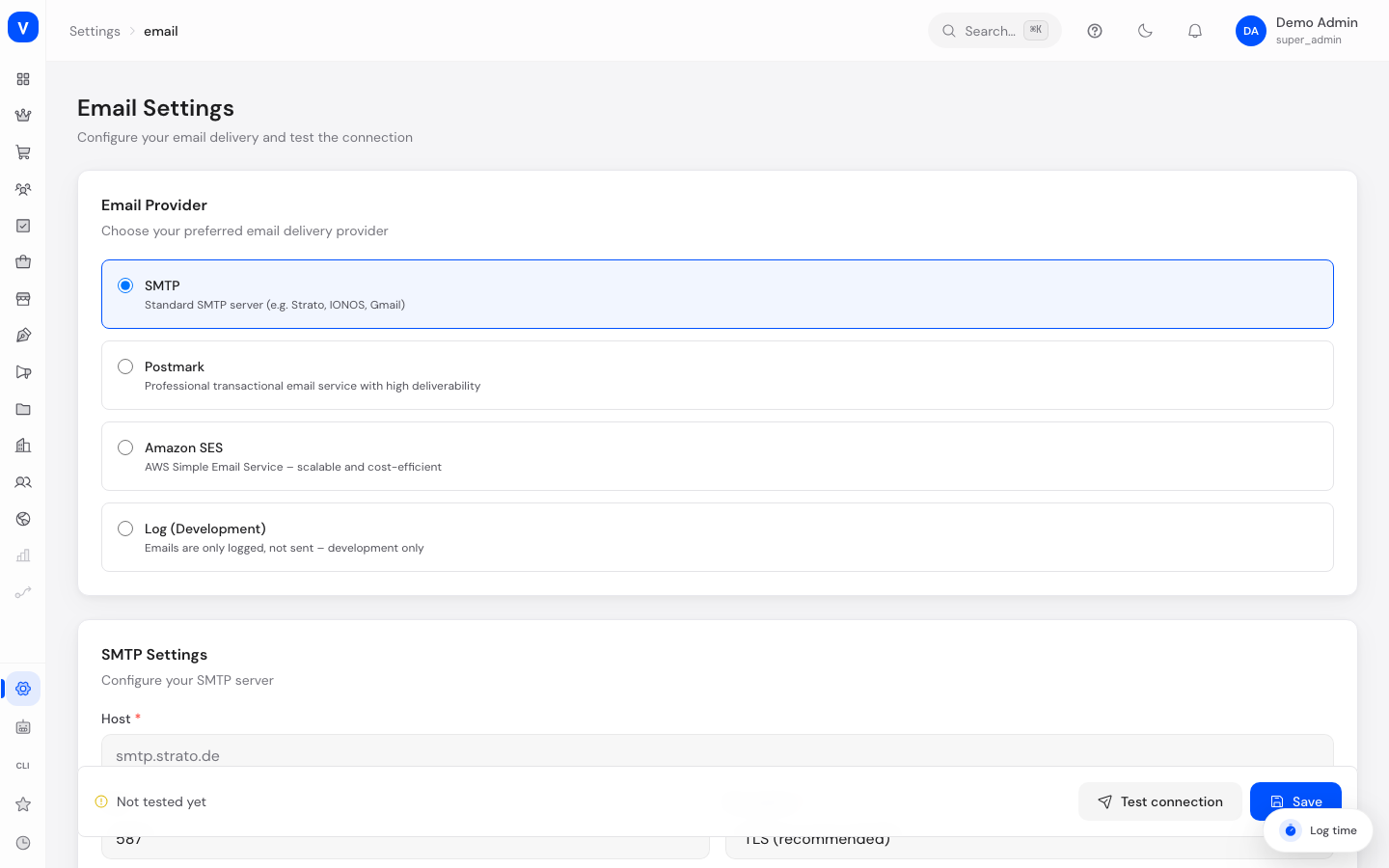
Here you decide which technical route SELLERLOGIC Commerce Services uses to send emails on your behalf — for example your own email server (SMTP) or a specialized delivery service like Postmark or Amazon SES. You also set the sender name and sender address used for all outgoing emails.
/settings/emailWhat can I do here?
- Choose a delivery provider: SMTP, Postmark, Amazon SES, or "log only" (no actual sending)
- Enter the credentials for the chosen delivery provider
- Set the sender name, sender address, and reply-to address
- Test the connection to make sure sending actually works
Step by step
- In the "Provider" section, choose the desired provider (SMTP, Postmark, Amazon SES, or Log Only for testing).
- Enter the technical credentials in the corresponding section (e.g. for SMTP: server, port, encryption, username, password).
- Fill in the "Sender" section with name, sender address, and optionally a different reply-to address. You may leave the sender name empty - SCS then uses your shop name automatically.
- Click "Test" to establish a test connection and catch errors early.
- Click "Save" to apply the settings.
Fields explained
| Field | Meaning | Notes/Effect |
|---|---|---|
| Provider | The technical route used to send emails | See values below |
| Server (SMTP) | Address of your email server | Only for provider "SMTP" |
| Port | Network port of the SMTP server | Common: 587 (TLS) or 465 (SSL) |
| Encryption | Type of encryption used for the SMTP connection | See values below |
| Username / Password (SMTP) | Credentials for the SMTP server | Password is stored encrypted; leave blank to keep it unchanged |
| Server Token (Postmark) | API access key for Postmark | Only for provider "Postmark" |
| Region / Access Key ID / Secret Access Key (SES) | AWS credentials for Amazon SES | Only for provider "Amazon SES" |
| Sender Name | Name shown as the sender in emails | Leave the field empty and your shop name from the settings is used automatically |
| Sender Email | Email address emails are sent from | |
| Reply-To | Different address that replies from recipients should go to | Optional |
Values & status
Provider
| Value | Meaning |
|---|---|
| SMTP | Sending via your own or a classic email server |
| Postmark | Sending via the specialized delivery service Postmark |
| Amazon SES | Sending via Amazon Simple Email Service |
| Log Only | Emails are not actually sent, only recorded — meant for testing |
Encryption (SMTP)
| Value | Meaning |
|---|---|
| TLS | Encrypted connection (recommended, usually port 587) |
| SSL | Encrypted connection (usually port 465) |
| None | Unencrypted connection — not recommended |
Frequently asked questions
Why aren't my test emails arriving?
Click "Test" to check the connection. With "Log Only", emails are intentionally not sent — choose a real delivery provider instead.
Do I need to re-enter the password every time I make a change?
No. Leave the password field blank to keep the already saved password — only filled-in password fields are overwritten on save.
What happens if I choose "Log Only"?
Emails aren't sent to real recipients, but are recorded in the Email Log — useful for testing new templates without any delivery risk.
Which name do my customers see in their inbox?
The sender name from this section. If it is empty, SCS uses your shop name from the settings - so your customers always see your shop and never the platform. If you want a different name (for example "Order Service Example Retail"), enter it here and it takes precedence.
How do I reset a sender name I set earlier?
Clear the field and save. From then on your shop name applies again automatically.
How do I know if my settings were last tested successfully?
A status indicator at the bottom of the page shows whether and when the connection was last verified successfully.
An email now visibly shows <b> instead of bold text - why?
Values that SCS puts into an email (customer name, address, order number, free text from a form) have appeared as plain text since August 2026. If such a value contains HTML markup, you see the markup itself rather than its effect. That is deliberate: otherwise somebody could inject foreign markup into your emails through a form field. The markup in your own templates is unaffected and still works; so are the places where SCS uses markup on purpose - the billing and shipping address in the order confirmation and the file list in the download mail.